Key takeaway
- DevRev is an AI-native platform that connects support, product, and engineering teams across organizations into one single workspace/system. DevRev features a virtual assistant called “Computer” that securely uses your company data to resolve queries and automate tasks.
- Customer success teams instantly gain complete background information on every incoming ticket.
- Development teams receive users’ complete bug reports with all the relevant history and details they need to fix them.
- The most secure method to evaluate the platform is by running a 4-to-6-week trial on their free entry-level, focusing on a single process to measure results.
If you have heard the name DevRev platform recently, you have probably also heard people talk about “Computer,” a DevRev Native App. And you might be wondering what DevRev Computer actually is and if it is simply a basic chatbot.
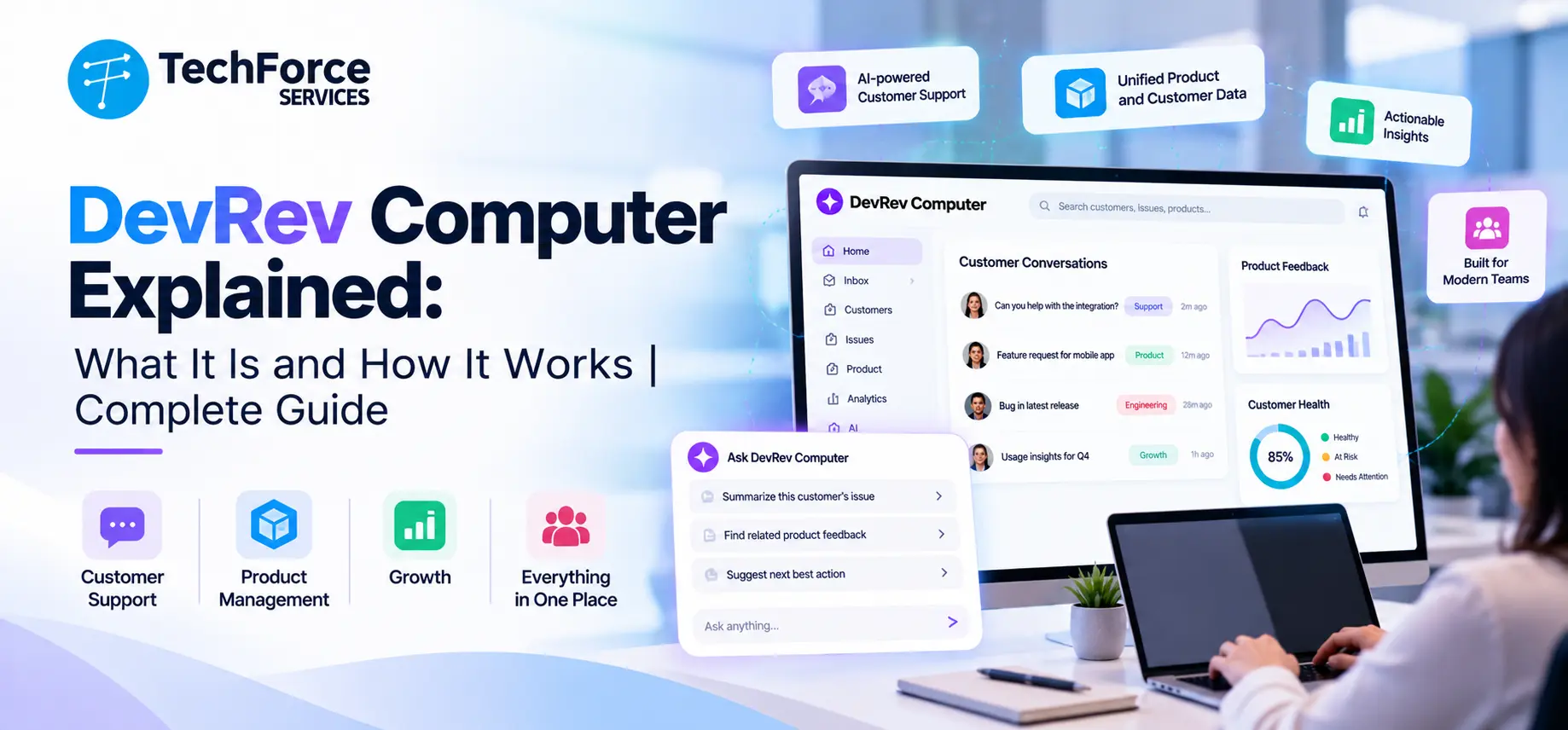
DevRev Computer is far more advanced than just a basic chatbot. DevRev Computer is an AI teammate that connects to your company data and provides answers to questions based on that data, and then executes tasks in the tools your team already uses. Rather than just searching and summarizing text inside the app, it acts as a functional system that is built to centralize information and complete operational tasks.
This guide explains what Computer by DevRev is, how it works, what it costs, and its business use cases. We wrote it for customer support executives, IT managers, operations teams, and Salesforce platform owners who want information on DevRev and how it helps.
What is DevRev Computer?
DevRev Computer is an AI platform from DevRev that acts as a teammate across your existing business tools. It reads both your structured data, like CRM records, tickets, and logs, and your unstructured data/texts (documents, emails, and chat threads), then uses both to give sourced answers and carry out tasks based on that information.
DevRev, the company behind it, was founded in 2020 by Dheeraj Pandey and Manoj Agarwal, who both came from the enterprise software world. The Computer platform was officially announced in 2025 and made generally available to DevRev customers on 9 February 2026, with a free Computer Mini tier alongside paid Pro and Max tiers.
The core concept of DevRev Computer is simple: most AI tools today can answer general questions, but they do not know your customers, your tickets, your active deals, or service histories. The DevRev AI-native platform is built to understand them by integrating directly with your database. Its overall goal is to give your teams one place to ask questions and get work done.
DevRev started as a collaboration platform that connects support, product, and engineering work; its product, called Computer, is the AI layer that works across it all.
What is DevRev? The platform behind Computer
DevRev is an AI-native platform that brings customer support, product development, and engineering teams into a single workspace. The name comes from “Dev” (the people who build the product) and “Rev” (the people who talk to and sell to customers). Its overall goal is to fill that gap between these departments, to make sure that when users face a bug or failure, the technical team receives the full information about it.
The company was founded in 2020 by former Nutanix CEO Dheeraj Pandey and co-founder Manoj Agarwal. It raised a $50 million seed funding round and then a $100.8 million Series A in 2024 at a $1.15 billion valuation.
Here is what DevRev actually is; it’s built on three key elements:
1. One shared/unified data model
Most companies keep a customer conversation in one tool, a support ticket in another, and an engineering issue in a third. DevRev helps keep all three as separate but linked records inside one system/workspace.
This allows a user chat to link to a ticket, and a ticket can link to developer tasks so that everyone gets the same visibility. This includes the customer account behind each record.
2. Core Function Application
DevRev built a model that combines all three functions and turned it into apps:
- Support: This module manages customer helpdesk tickets, multi-channel chats, and automated, AI-driven troubleshooting.
- Build: This tool helps product management and software development teams track code defects, feature requests, and product roadmaps.
- Observe: It helps leaders observe as the third functional application. (Its current scope is unknown, as the product has been repackaged over time.)
3. The role of DevRev Computer
DevRev Computer is the AI layer that runs across those apps and your outside tools. While employees use the main applications to complete their routine responsibilities, DevRev Computer acts as an AI coworker that searches across everything & gathers information, answers questions, and automates processes.
Originally, DevRev marketed the platform as a direct alternative to legacy software like Salesforce and Jira. But with the computer, it also describes running alongside the tools you already use with two-way sync. Which approach suits you depends on your stack, so always scope it before you decide.
How does DevRev Computer work?
DevRev Computer is made of a few building blocks, and understanding them helps you see why it is different than a general AI chatbot.
1. Computer Memory
Computer memory works as DevRev’s central knowledge graph. It is a map of how things relate to each other, such as which customer raised which ticket, which product it affects, and which engineer owns the fix.
This includes both structured data (accounts, opportunities, tickets) and unstructured data (emails, call summaries, Slack or Teams chats). Because everything sits in one connected source, the AI can answer questions that cut across systems. Their main goal with Memory is to give the AI full context, so answers are specific to your business.
2. Computer AirSync
Computer AirSync is the two-way sync engine that helps build memory. It brings data in from other tools and writes changes back out. DevRev’s developer documentation says AirSync can import existing data from an external system, export changes made in DevRev back to it, and keep both in sync.
This two-way functionality is critical because it allows the AI to modify data rather than just read it. It can create, update, and reassign records in connected systems. DevRev provides native connectors, called snap-ins, for tools such as Jira and Zendesk, or via custom APIs.
3. AI agents with human oversight
On top of Memory, DevRev’s computer runs specialized AI agents that handle tasks such as answering a customer, creating a ticket, or updating a record. DevRev says these agents work with human oversight when you need it, so people stay in control of sensitive steps.
4. Apps and Agent Studio
DevRev Computer also powers DevRev’s apps for support, product building, and observability. It also helps with Agent Studio for building custom agents. This is where teams turn the general platform into a specific workflow, such as a claims status agent or a student inquiry agent.
What can DevRev Computer do in a real scenario?
Here are some practical examples of DevRev; they are based on how DevRev describes the product:
- Answer a support question using tickets by extracting information from documentation and past resolutions, with sources shown.
- Instantly generate a development ticket in Jira directly from a user helpdesk request and link the two automatically, a core capability of any AI ticketing system.
- Update a Salesforce record and notify the right Slack channel in one step.
- Check an incident system for outages affecting a customer before a human replies.
- Handle internal IT and HR requests such as access, passwords, and policy questions.
- Monitor live projects, flag problems early, and produce status reports.
- Take voice conversations, since DevRev added Voice AI that draws on the same shared memory.
For example, a support agent asks, “Which customers are still waiting on a reply, and which of them have an open engineering bug?” A general chatbot fails to answer that. DevRev Computer answers it immediately because it connects the ticket system and the engineering tracker through memory.
How is DevRev Computer different from a chatbot or copilot?
These three terms are worth comparing DevRev Computer to a chatbot, so here they are:
- A chatbot answers questions from a fixed script or a limited knowledge base. It usually stops at the answer.
- A copilot helps one person inside one tool, for example, by drafting a reply or summarizing a page.
- DevRev Computer, as an AI teammate, works across tools, holds long-term context, and takes action with permission.
DevRev uses the “AI teammate” label for Computer because its function is to act, not only answer. It does know your data through shared memory; it can act based on your system information, and you can always track and control what it did.
Who is DevRev Computer for?
DevRev Computer is designed for enterprise teams that lose time switching between systems, data silos, and chasing context. In practice, that means:
- Customer support and service teams: Their main goal is to resolve more inquiries without losing quality and to send hard cases to the technical team with the full story attached.
- IT and HR service desks: These teams handle repetitive requests, such as access and policy questions; that’s where automation is required, and the DevRev Computer helps with it.
- Sales and operations teams: They need pipeline, account, and customer answers without opening five tools.
- Product and engineering teams: They want customer issues to reach engineering with context, not as a forwarded email but with full technical context. DevRev Computer does that.
- Salesforce platform owners: They want AI that works alongside the CRM they already run, instead of a rebuild.
Teams in other industries, such as insurance, higher education, and manufacturing, can use the same approach for high-volume inquiries and service desks.
What does DevRev Computer cost?
DevRev uses tiers and a consumption model based on AI credits.
- Computer Mini is the free entry tier; it offers organization-wide search, basic automation, and basic integrations for tools like Slack, Notion, Jira Cloud, and Microsoft Teams.
- Computer Pro is the paid tier for teams. Pricing is through sales.
- Computer Max is a top-tier enterprise package, including a dedicated applied AI team, enterprise security features such as SCIM, and faster sync. Its pricing requires a direct sales quote.
Is DevRev Computer secure?
Security is usually the second question after”What does it do?” from most enterprise organizations. DevRev’s trust center lists SOC 2 Type 2, GDPR, HIPAA, and ISO/IEC 27001:2022 compliance for its Computer platform. It also lists object-level permission awareness, audit trails, and flexible data residency options.
Permission awareness means the AI should only see and act on what the person asking is allowed to see. Audit trails mean you can review what it did afterwards.
Things to consider while you assess security include:
- Ask which data regions are available and whether Australian hosting is offered for your plan. This matters most in financial services and government.
- Ask how long data is retained and whether it is used to train models.
- Ask which automated processes require mandatory human approval and whether actions can be reversed or not.
- Request the vendor’s official security documentation, audit reports, and certifications in writing.
These are standard procurement due diligence steps; official regulatory decisions should always rely on formal vendor contracts rather than website documentation.
Things to consider before you adopt DevRev Computer
Here are some points worth reviewing before you adopt DevRev Computer for your organization:
- Implementation Scope: User reviews on G2 describe DevRev as powerful but note a learning curve, so plan for a dedicated commitment to initial configuration and organizational change management.e management.
- User Onboarding: If you want to maximize the platform’s ROI, it typically requires structured team training and clearly defined operational use cases.
- Hybrid workflows: Some teams still keep other tools for specialized cases, which means more integration work.
- Data quality: The accuracy of the AI’s answer is directly dependent on the knowledge and records behind it.
- Existing stack: If your organization runs Salesforce, Jira, or Zendesk, you must plan how DevRev Computer will sync with them or map data across them.
For Salesforce environments, our Salesforce integration services team can map objects and sync rules before you go live.
- Existing stack: If your organization runs Salesforce, Jira, or Zendesk, you must plan how DevRev Computer will sync with them or map data across them.
How to get started with DevRev Computer, Guided by TechForce Services
Adopting a new AI platform can feel overwhelming, but you don’t have to do it all alone. Partnering with TechForce Services ensures a smooth, strategic rollout through our DevRev Computer implementation services.
Here is our simple step-by-step path for a successful first trial:
- Select a Test Use Case: We help you identify a high-volume, low-risk process such as order status, access requests, or common support questions to test the system.
- Benchmark Current Performance: Before making any changes, our team works with you to prepare a document of current handle time, escalation rate, and resolution time before you change anything.
- Connect your data: Our experts seamlessly link your existing ticketing, CRM, and knowledge sources using AirSync connectors.
- Start on Mini, then move to Pro: We recommend starting with the free Computer Mini tier to validate real-world scenarios. Once the workflow is proven, TechForce Services guides your seamless expansion to the paid Pro tier for full production use.
- Set approval rules: We help you establish clear AI governance. Decide which operations or actions the AI can execute autonomously and which require human verification.
- Measure and review: After a 4-to-6-week trial window, we analyze the performance data alongside your initial benchmarks to prove business value, optimize the agents, and map out the next phase.
Now that you know the basics, it’s time to apply this to your own team with expert support.
Ready to begin? Book a free 30-minute discovery call with TechForce Services to see how Computer by DevRev can optimize your cross-department workflows.
Conclusion
It is built for teams that want work done across systems, rather than another standalone chatbot. If you want to test it for your organization, we suggest testing with a smaller task or one workflow and measuring the business results it helps with.
If you need assistance structuring this initial trial, talk to our DevRev Computer team. TechForce Services provides specialized consulting and local delivery teams to help you scope and execute your pilot successfully.

FAQs about DevRev Computer
What is DevRev Computer?
DevRev Computer is an AI teammate from DevRev. It connects your tickets, CRM records, documents, and messages into one knowledge graph, then answers questions and takes action across your tools by using shared memory. It is different than a basic AI chatbot, as it is designed to work with your existing data and help with tasks such as creating tickets or updating records with full human control where needed.
Is DevRev Computer free?
Yes, but not completely. DevRev offers a free tier called Computer Mini, which includes search, a conversational interface, basic automation, and one-click connectors. Pro and Max are paid tiers with sales-led pricing and consumption-based AI credits; you can check DevRev’s pricing page for current details or feel free to contact TechForce Services for proper scoping and pricing accordingly.
How does DevRev Computer work?
DevRev Computer builds a knowledge graph called Computer Memory from your structured and unstructured data. It also uses AirSync; it is a two-way sync engine that brings data in and writes changes back to your tools. AI agents then use that context to answer questions and perform actions, with human permission controls and audit trails of what it did so your team never misses anything out of sight.
What is DevRev Computer AirSync?
DevRev Computer AirSync is DevRev’s sync engine that imports data from an outside system through connectors, exports changes made in DevRev back to that system, and keeps the two aligned. DevRev offers native connectors for tools such as Jira and Zendesk, and third parties can build their own connectors for better tool AirSync.
Does DevRev Computer work with Salesforce?
DevRev says the computer can run alongside Salesforce and keep data in sync in both directions. That means you do not have to replace your CRM to use it. The exact objects, fields, and sync behavior depend on your setup, so scope the integration before you commit to enrolling DevRev Computer inside your organization.
Is DevRev Computer secure?
DevRev lists SOC 2, GDPR, HIPAA, and ISO 27001 compliance, plus permission-aware answers, audit trails, and flexible data residency options. Still, for regulated industries, we suggest confirming the available hosting regions, retention rules, and approval controls in writing before you proceed.
Is DevRev only for SaaS companies?
No, DevRev’s earliest customers were software and SaaS companies, and reviews describe it as suiting SaaS firms, startups, and enterprises. But the same approach can work for any organization with high-volume inquiries or an internal service desk. If you are using it for any other industry outside software, run a small pilot first to check if it fits your organization or not.
How does DevRev connect support and engineering?
DevRev Computer stores tickets and engineering issues in one data model and links them. An agent can see whether an issue is already open, and an engineer can see which customers a bug affects. It can also create and link records across outside tools such as Jira, so the connection works even if engineering keeps its existing tracker.